Independent review
Joplin review: what our test found
Joplin 3.7.12 kept a Markdown notebook tree, attachments and a full sync copy on a Pixel 7 emulator with no account and, for half the test, no network. Search is fast and precise, but it matches word starts only. Getting a copy of your notes off the phone takes some planning.
- Developer
- Laurent Cozic
- License
- AGPL-3.0-or-later
- Version tested
- 3.7.12
- APK release
- (external site)
- Emulator test
- Google Play installs
- 500K+
Task guides and troubleshooting
| Task guide | From the guide |
|---|---|
| Attach images and PDFs in Joplin, open them offline and export every note as JEX | The image line in the note shows a long code instead of the file name. Jump to the fix |
| How to organize Joplin notebooks in Markdown and find any note with search | We tapped Apply in the tag dialog and the note still had no tag. Jump to the fix |
| Joplin on Android 16: set up a local backup folder and see where your notes live | The folder picker said Can't use this folder. Jump to the fix |
| Joplin vs. Standard Notes for offline notes on Android | Standard Notes said Encryption is not enabled on a fresh install. Jump to the fix |
Our verdict, criterion by criterion
| Criterion | Verdict | What we saw |
|---|---|---|
| Usability | Clear for notes, slower for settings | Notebooks, sub-notebooks, notes and tags each took a few taps. The editor rendered bold and checkboxes as we typed, and a banner explained how to turn that off. Settings are split over eleven pages that show a Back arrow in place of the sidebar button, so you go back before you can switch notebooks. |
| Offline use | Works fully offline | With airplane mode on, we opened a note with an image and a PDF, opened the PDF, exported a JEX file and ran a full sync to a local folder. Nothing asked for the network. |
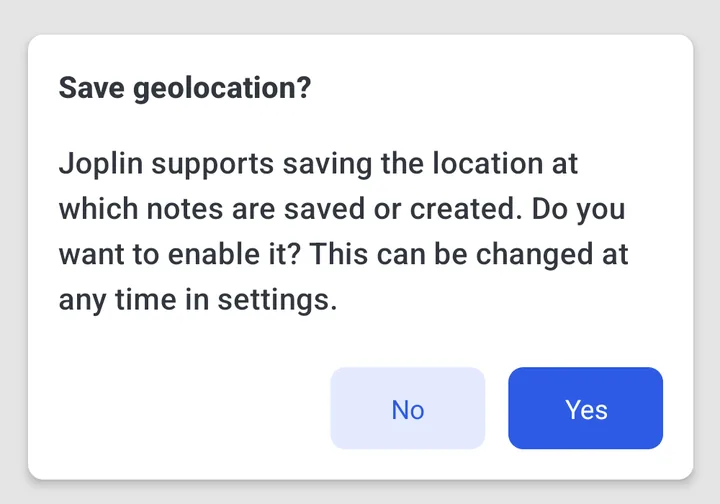
| Privacy | No account, no permissions granted | The app opened on its Welcome notebook with no sign-in screen. It asked once whether to save the location of notes, and we said No. After the test, Android listed every runtime permission of the app as not granted: attachments and the backup folder went through the system file picker. The data safety section of the Play listing, filled in by the developer, says no data is collected or shared. We did not inspect network traffic. |
| Free vs paid | Free app, optional paid cloud | We saw no ads, paywall or purchase prompt. The paid part is Joplin Cloud, one of ten sync targets in the app. The File system target we used for a local copy cost nothing. |
| Limits found in testing | Some, mostly around getting data out | Export all notes as JEX only opened the share sheet, and our emulator offered no app to save the file locally. Search does not find parts of words. Two help pages describe older behaviour: one says mobile cannot organise sub-notebooks, and one says a single word matches only that exact word. |
Limits we ran into
| # | Limit found in the test |
|---|---|
| 1 | Search finds word starts only. omat returned nothing, while tomato also found tomatoes. |
| 2 | The JEX export goes to the Android share sheet. On our emulator it listed Quick Share, Joplin, Drive and Gmail, and no local save option. |
| 3 | Android's own backup skips Joplin: the installed package did not have the ALLOW_BACKUP flag. |
| 4 | The File system sync folder is not meant to be browsed. Each item is a file named by a 32 character ID, as the Joplin FAQ explains. |
| 5 | Delete runs without a confirmation dialog. The note goes to the Trash, which is kept for 90 days by default. |
Free vs paid
The Android app costs nothing, and we met no ads, subscriptions or locked features in the test. Joplin Cloud is the paid sync service: the plans page (external site) listed Basic at 2.99 euros a month with 2 GB of storage and 10 MB per note or attachment, and Pro at 5.99 euros a month, both with a free trial. You do not need it. The app also syncs to Dropbox, OneDrive, Nextcloud, WebDAV, S3, Joplin Server or a folder on the phone, and we used only the folder.
How we tested
We installed Joplin 3.7.12 on a Pixel 7 emulator running Android 16 (API 36). The APK came from the download link on the Joplin install page (external site). Its SHA-256 was f5cf596d7ffc62b61c7c98d2f2149e3624f4fd283b09e9acb0cca210745ced79, the same digest GitHub lists for the 3.7.12 Android release (external site).
- Fresh install, no Joplin Cloud account and no Google account on the emulator.
- Three notebooks (Garden, its sub-notebook Seeds, and Kitchen) and six notes of our own, one of them with a PNG image and a PDF attached.
- Ten search queries, from a single word to tag and notebook filters.
- An offline check with airplane mode on, a JEX export, a sync to a local folder, and a delete and restore from the Trash.
GrowShift has no affiliation with the Joplin project or Joplin Cloud.
First launch
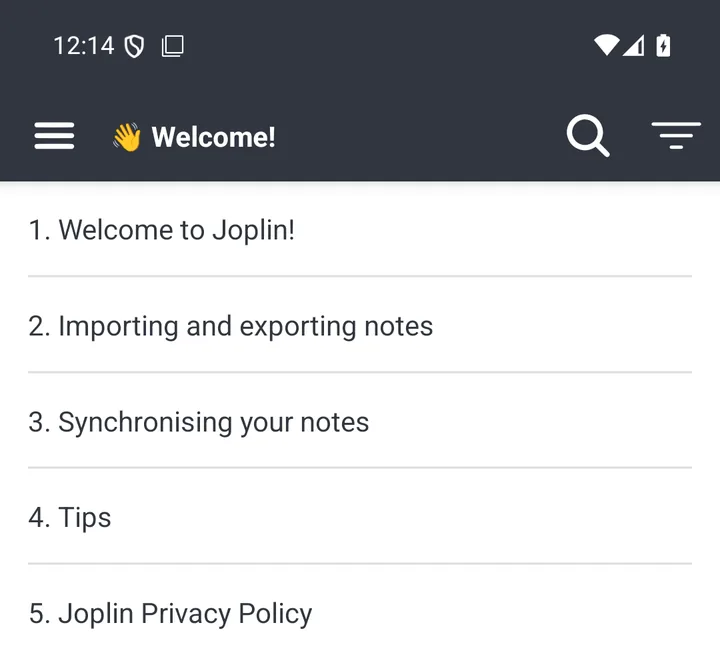
Joplin opened straight on a notebook called Welcome! with five notes, from Welcome to Joplin! to Joplin Privacy Policy. There was no sign-in screen and the sync target was set to (None). The first time we created a note, the app asked whether to save the location where notes are created.
What we did not test
- Joplin Cloud and the other online sync targets, and end-to-end encryption.
- Importing a JEX file, and syncing the local folder with Joplin on a computer.
- Attachments larger than 10 MB, which the Joplin help says are not supported on mobile.
- The biometric lock, which the app marks as Beta.
- Plugins, the web clipper, OCR and to-do reminders.
Sources
We checked these sources on the test date.
- Joplin Android 3.7.12 release (GitHub) (external site)
- Joplin: Installation (external site)
- Joplin on Google Play (external site)
- Joplin Cloud plans (external site)
- Joplin license (LICENSE, AGPL-3.0-or-later) (external site)
- Joplin help: Searching (external site)
- Joplin help: Sub-notebooks (external site)
- Joplin FAQ (external site)