Tutorial · Loop Habit Tracker
How to read the score, overview and charts in Loop Habit Tracker
Loop's habit page has six cards and a score that is not a simple percentage. We read every card on a four-week habit, compared the daily and weekly views of the score chart, and marked a skip to see what it changed: the score went from 35% to 37%.
Test record
- App
- Loop Habit Tracker 2.3.2 (GitHub release APK)
- Device
- Pixel 7 emulator, Android 16 (API 36)
- Tested
- APK source
- official release page (external site)
- Conditions
- Fresh install with no account. Habit Read 20 pages, set to Every day, with 12 check-ins on Mondays, Wednesdays and Fridays over four weeks. A second habit, Gym, with the same check-ins and a frequency of 3 times per week, for comparison. Skip days turned on in Settings for the last part.
Six cards, six questions
Tap a habit's name and Loop opens its statistics page. Each card answers a different question, and mixing them up is the most common way to misread your progress. This is what each card showed on our test habit, Read 20 pages, after four weeks of check-ins on Mondays, Wednesdays and Fridays.
| Card | Question it answers | What we saw |
|---|---|---|
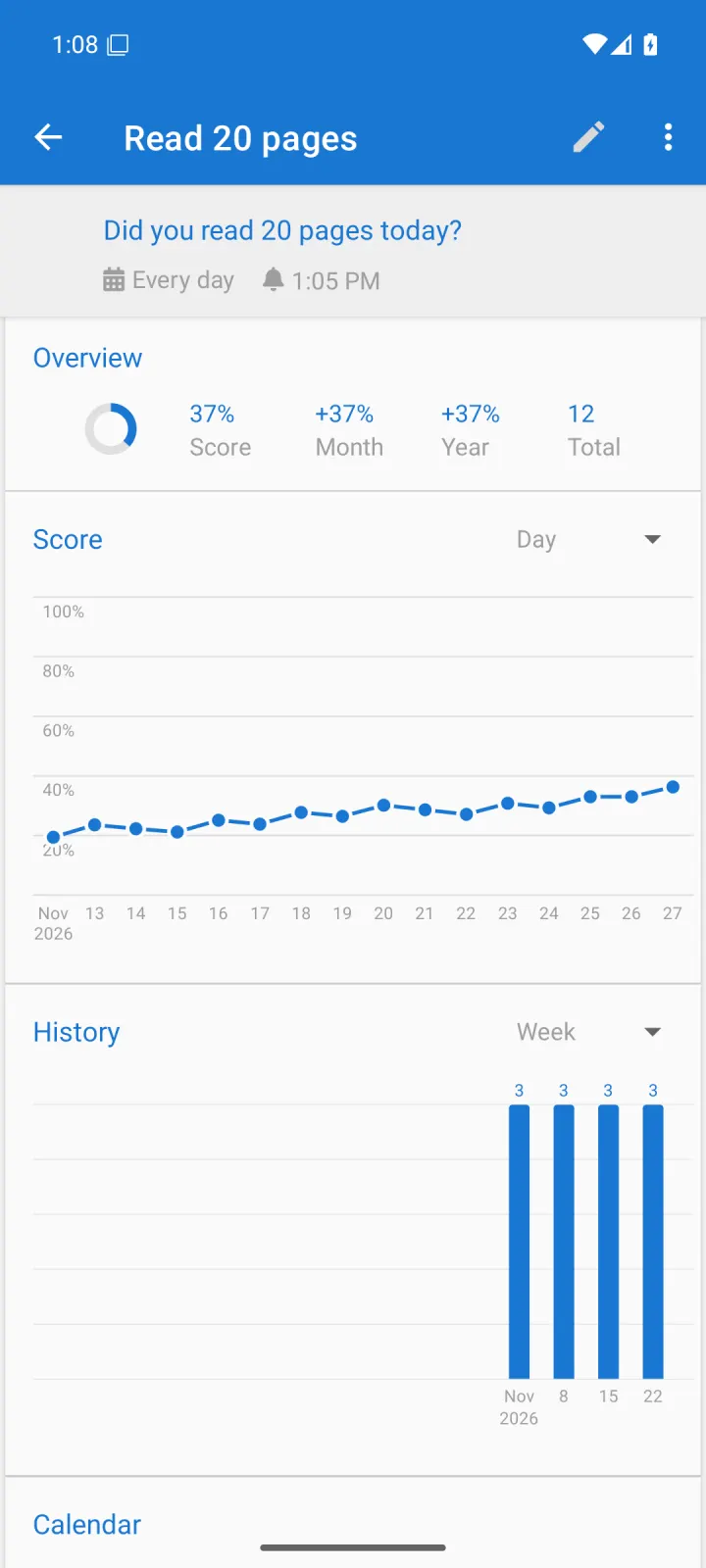
| Overview | Where is the habit today, and how much did it change? | 35% score, +35% month, +35% year, 12 total |
| Score | How did the score move over time? | A zigzag from about 20% up to 35% |
| History | How many check-ins per week, month, quarter or year? | Four weekly bars of 3 |
| Calendar | Which exact days did I do it? | Mondays, Wednesdays and Fridays in blue |
| Best streaks | What are my longest runs of consecutive days? | A list of one-day streaks |
| Frequency | On which weekdays do I usually do it? | Dots on Mon, Wed and Fri only |
Overview: four numbers, two of them often misread
Step 1 Read Score and Total first
Score is today's value of the habit's score. Total counts the days you marked yourself: 12 in our test. The hollow checkmarks Loop adds on its own are not counted.
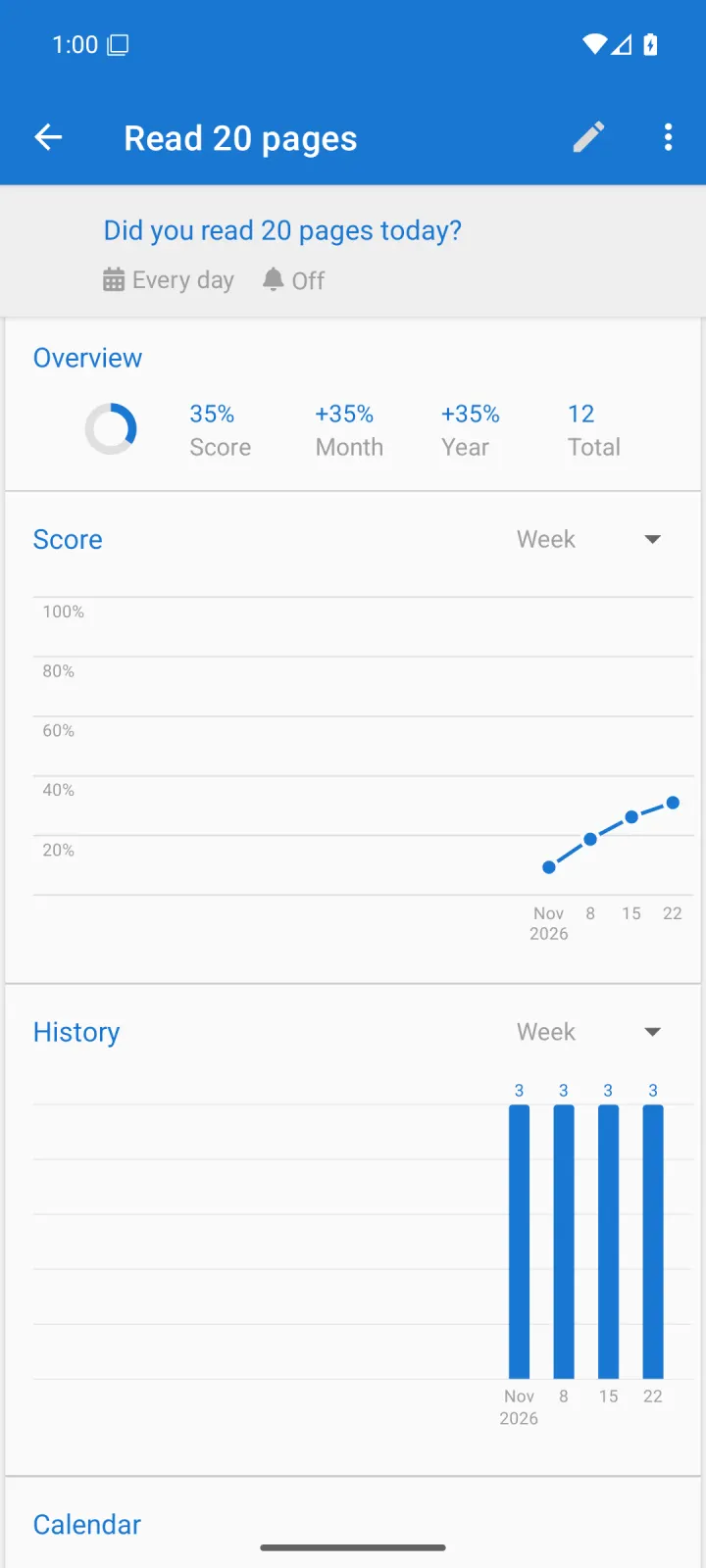
Month and Year are not averages. In the 2.3.2 source code, OverviewCard.kt (external site) computes them as today's score minus the score 30 days ago and 365 days ago. Our habit was four weeks old, so both showed +35%, the whole score. On an older habit, a negative Month means the habit slipped in the last 30 days, even if the score is still high.
Score chart: choose the zoom before you judge
Step 2 Open the interval menu
The menu next to the Score title offers Day, Week, Month, Quarter and Year. It opened on Week, where each point is one week.
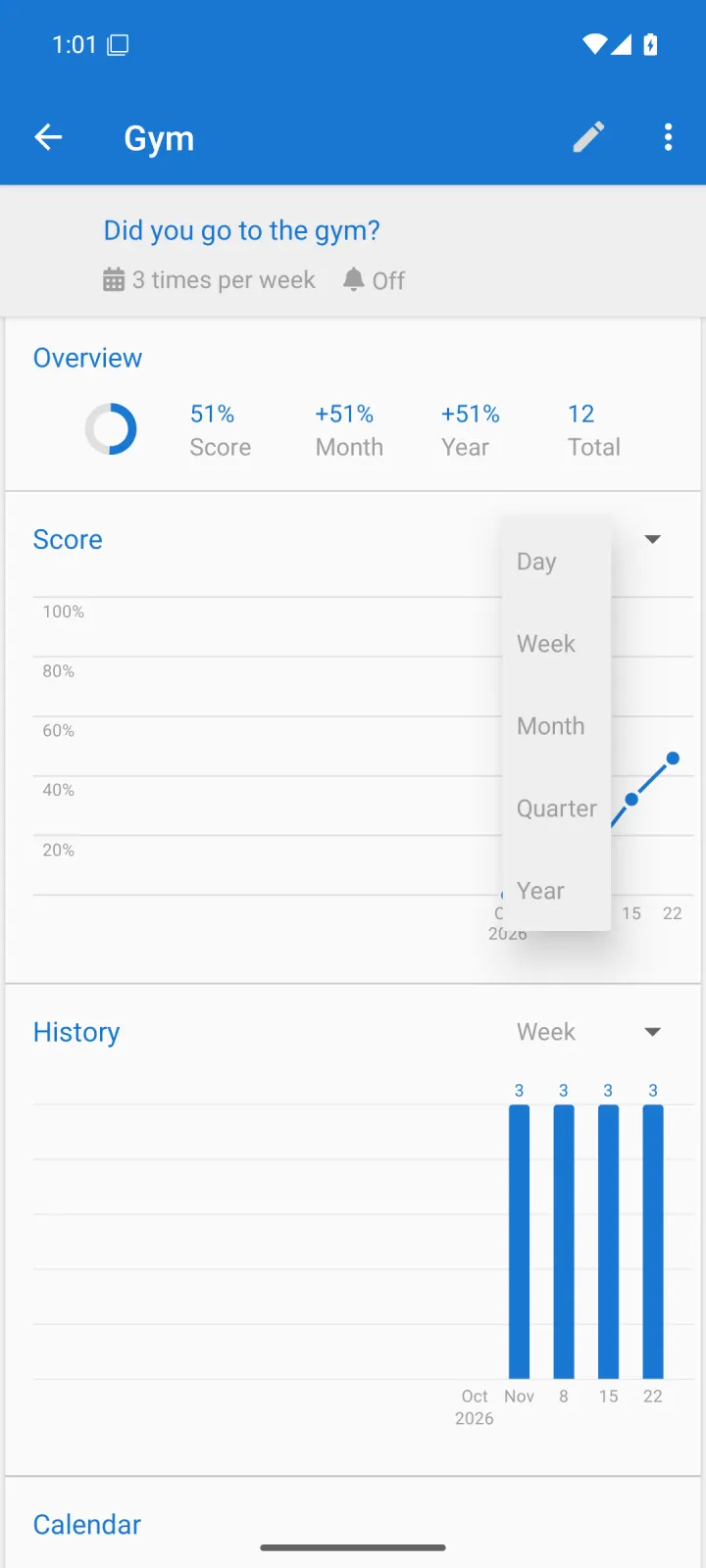
Step 3 Switch to Day to see each check-in
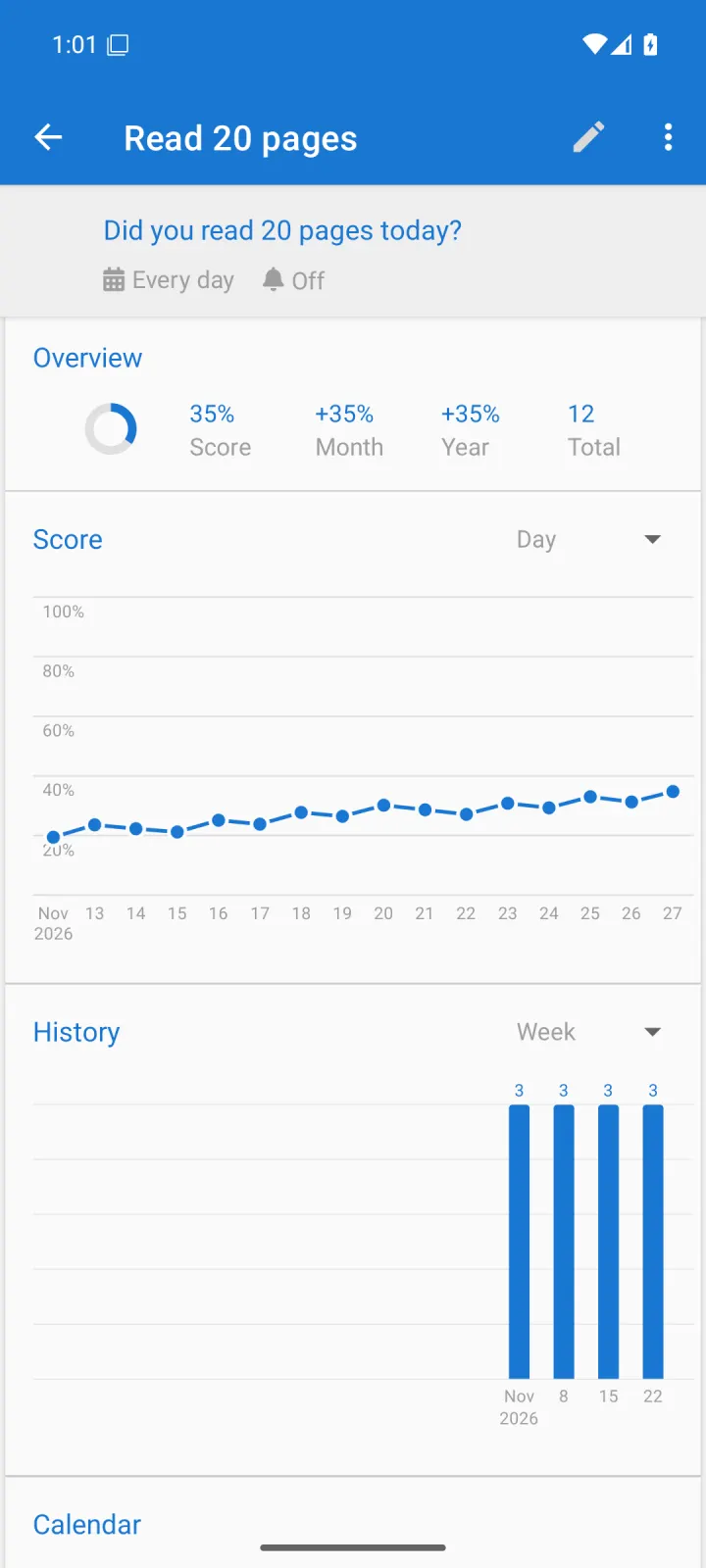
In Day view, the daily habit zigzags. The line goes up on each Monday, Wednesday and Friday and down on the days between. It still ends higher than it started, at 35%.
Step 4 Compare with a habit that has a weekly goal
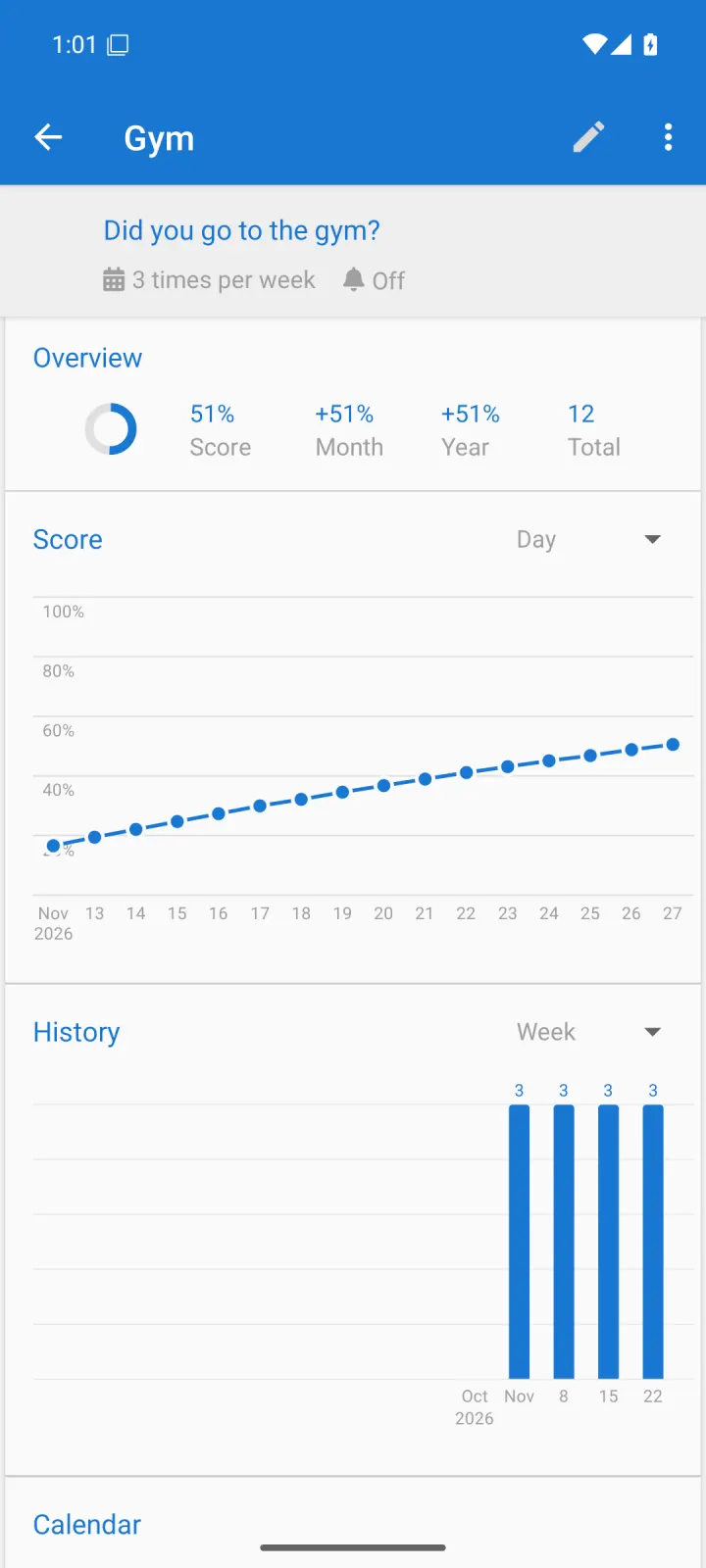
Gym had the same check-ins but a goal of 3 times per week. Its Day view is a smooth line that rose every day, to 51%. Rest days did not count as misses, so there was nothing to pull it down.
History, calendar, streaks and frequency
Step 5 Scroll to the bottom cards
History counts check-ins per period: four bars of 3 for our four weeks. Calendar shows each day. Best streaks listed only one-day runs, because we never did the habit two days in a row. Frequency placed dots on Monday, Wednesday and Friday, a quick way to see your real routine.
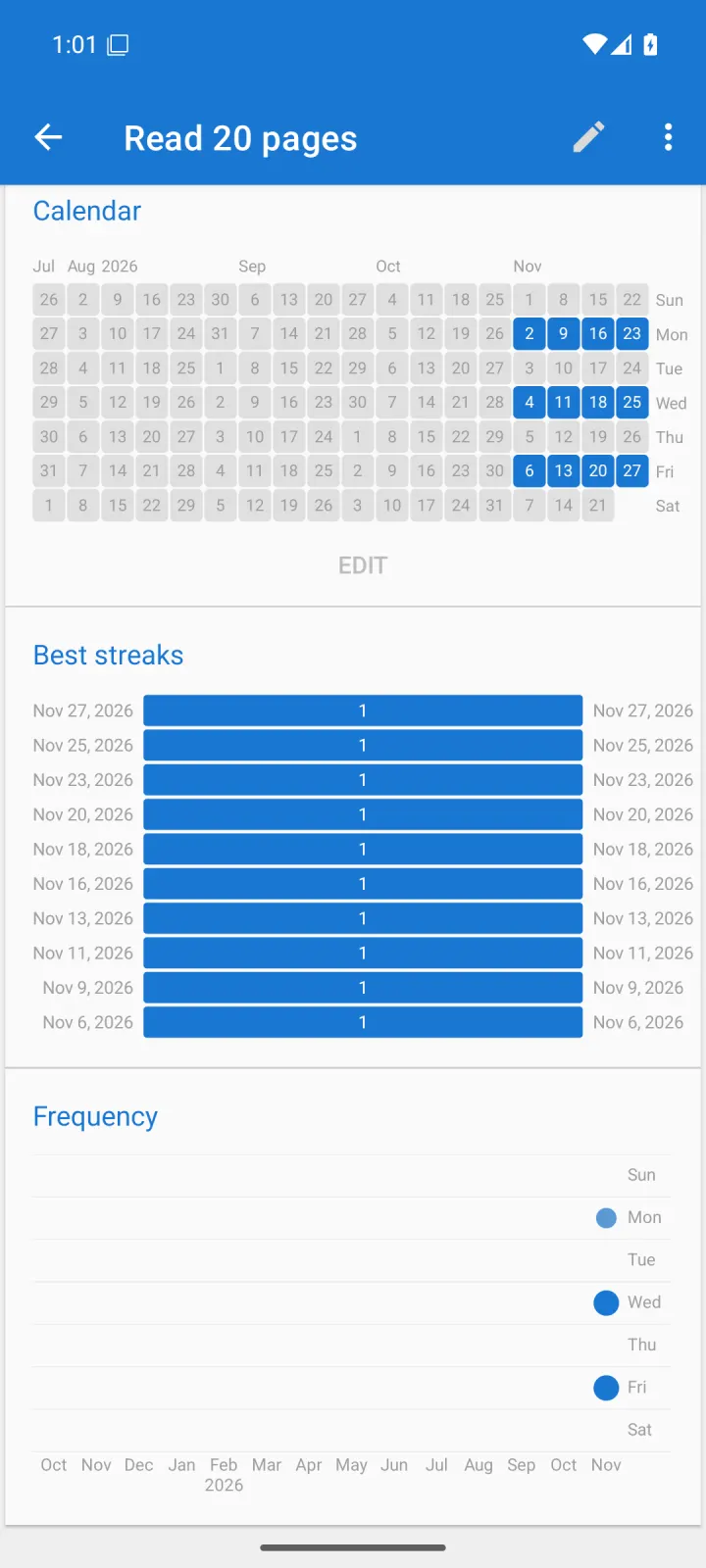
The streaks card is the one to ignore for habits you do a few times a week. Our score rose for four weeks while the longest streak never passed one day. The Loop FAQ (external site) says the score was designed so that every repetition counts, old ones included, and a few repetitions lift a low score quickly.
Skips: the dash that protects the score
Step 6 Turn on skip days
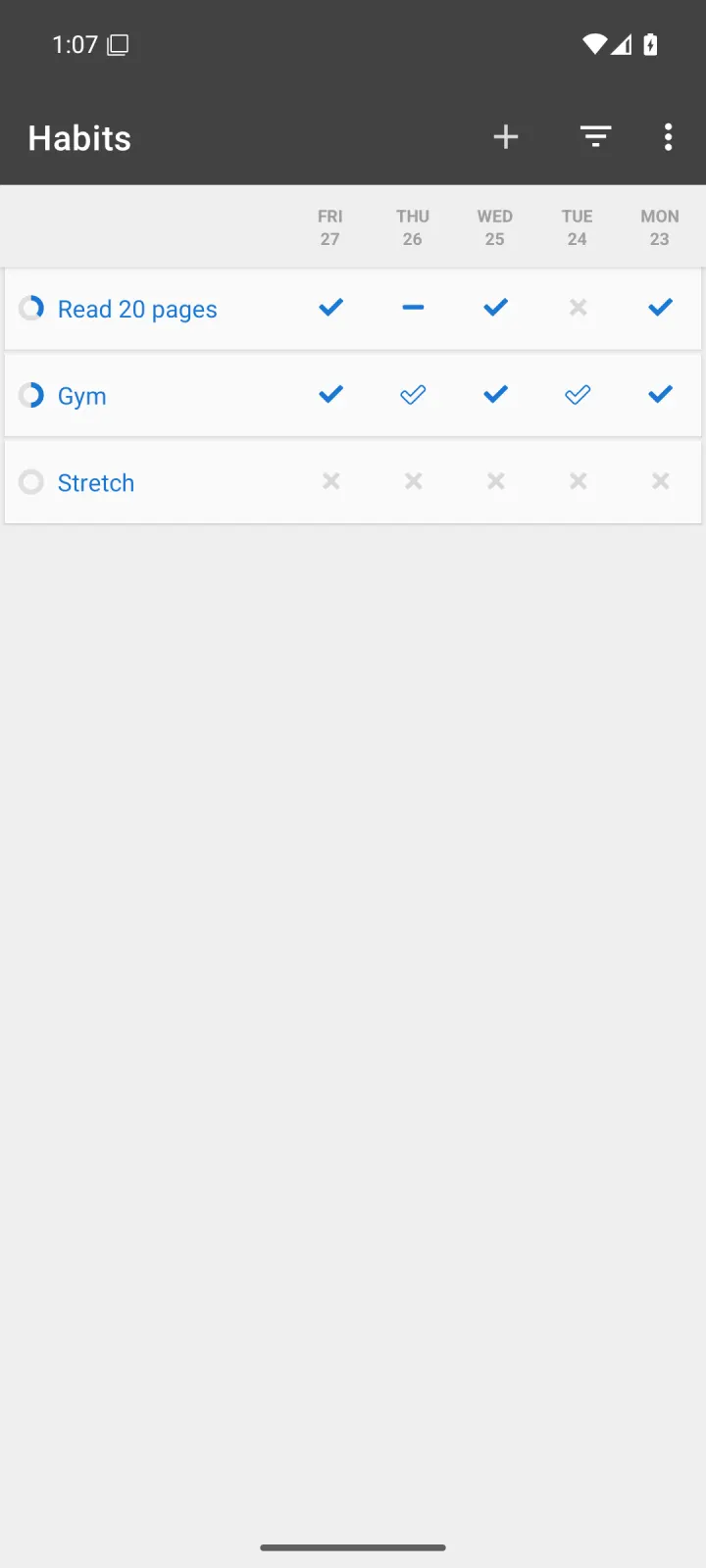
Open the three-dot menu, then Settings, and turn on Enable skip days. Its description says: toggle twice to add a skip instead of a checkmark, and skips keep your score unchanged and do not break your streak.
Step 7 Press the day twice
On the main screen, a long press on a cell adds a check. A second long press on the same cell turns it into a dash. We marked Thursday 26 November, a missed day, as skipped.
Step 8 Check the overview again
The score went from 35% to 37%. Total stayed at 12, because a skip is not a check-in.
Three readings to avoid
- Reading Month as this month's average. It is the change since 30 days ago.
- Comparing scores of habits with different frequencies. Ours differed by 16 points with the same check-ins.
- Judging a few-times-a-week habit by Best streaks. Watch the score and the Frequency card instead.
Common errors and how we fixed them
ProblemMonth and Year showed the same number as the score.
FixNormal for a habit younger than 30 days. The score 30 and 365 days ago was zero, so the whole score counts as change.
ProblemA long press added a check, and no dash appeared.
FixSkips only exist after you turn on Enable skip days in Settings. Then press the same cell a second time.
ProblemThe score chart looked almost flat.
FixIn Week view, daily ups and downs are averaged out. Switch the menu next to Score to Day.
Sources
We checked these sources on the test date.