Tutorial · AnkiDroid
How to build your first AnkiDroid deck and set daily limits for new cards and reviews
We created a deck, typed in 12 notes and tuned New cards/day and Maximum reviews/day in AnkiDroid 2.25.3, including the one-day override and the warning the app shows when the two limits do not match.
Test record
- App
- AnkiDroid 2.25.3 (GitHub release, x86_64 build)
- Device
- Pixel 7 emulator, Android 16 (API 36)
- Tested
- APK source
- official release page (external site)
- Conditions
- Fresh install, no AnkiWeb account, empty collection at start. 12 Basic notes typed in by hand. Default deck options until we changed them.
What you end up with
One deck, a dozen cards and two numbers that decide how heavy each study day feels. We did every step below in AnkiDroid 2.25.3 on a Pixel 7 emulator running Android 16, starting from an empty collection and without an AnkiWeb account.
The two numbers are New cards/day, how many unseen cards the app introduces each day, and Maximum reviews/day, a ceiling on review cards. In our fresh install they were 20 and 200.
Create the deck
Step 1 Open the + menu and pick Create deck
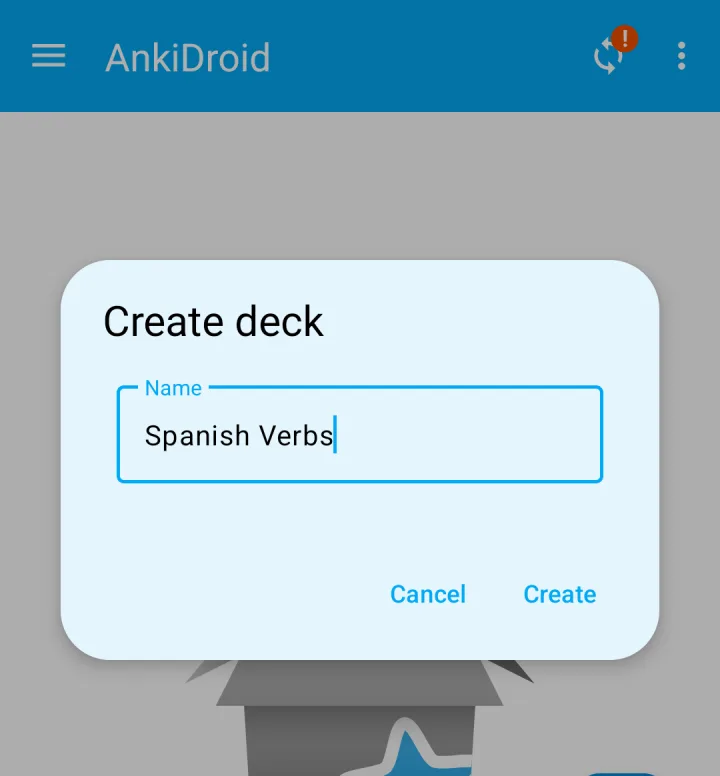
On the deck list, tap the round + button at the bottom right. It expands into Get shared decks, Create filtered deck, Create deck and Add. Tap Create deck, type a name and tap Create. We used Spanish Verbs. A short Deck created message appeared and the deck showed up with three zeros next to it.
Add your first notes
Step 2 Open the note editor
Tap + again, then Add. The editor opened with the note type Basic and our new deck already filled in the Deck field, so there was nothing to change before typing.
Step 3 Type the front and back, then save
Fill Front with the prompt and Back with the answer, then tap the check mark at the top. Each save showed 1 card added and cleared both fields for the next note. We added 12 Spanish verbs, from hablar / to speak to querer / to want.
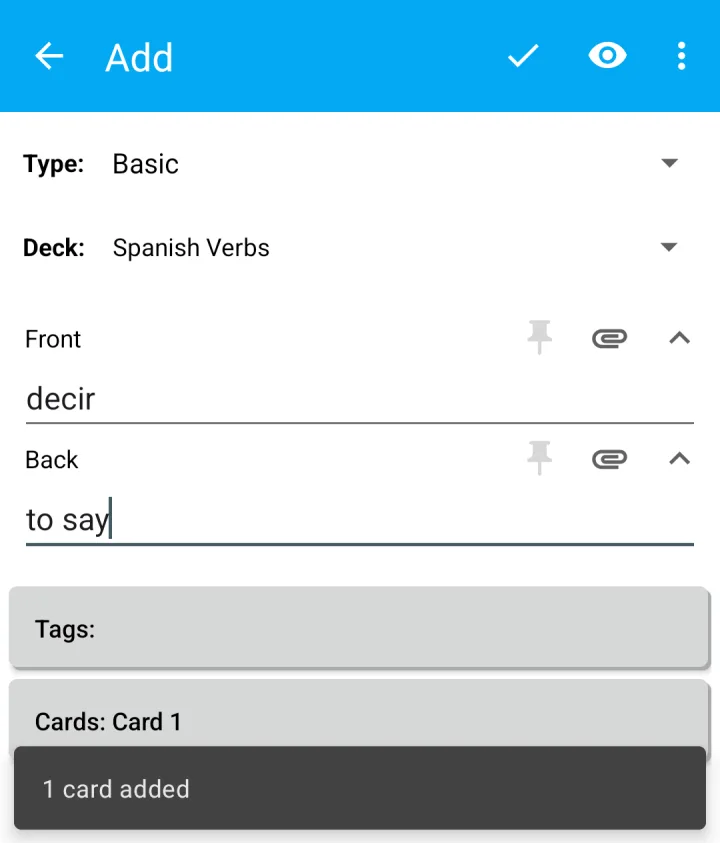
Keep each note to one fact. A Basic note makes exactly one card, and the editor confirms it with the line Cards: Card 1 under the tags.
Step 4 Check the counts on the deck list
Go back to the deck list. Our deck now showed 12 in blue and the header read 12 cards due. The AnkiDroid manual (external site) explains the three numbers: new cards in blue, cards in learning in red and reviews due in green.

Find the options for this deck
Step 5 Long-press the deck name
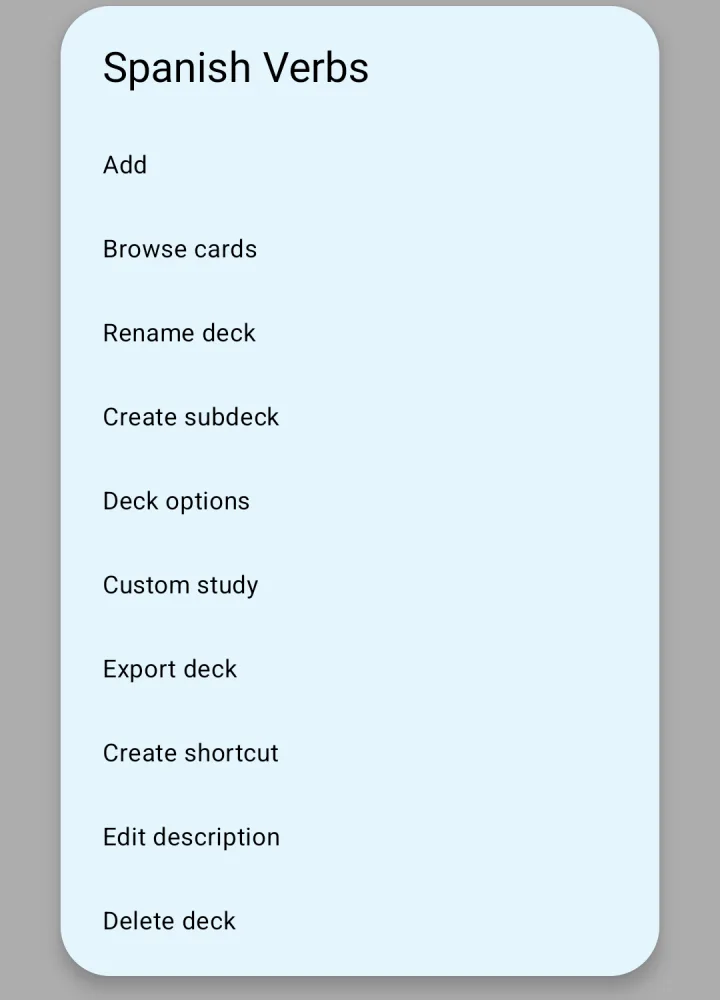
A normal tap on the name starts a study session, so press and hold instead. The menu that opens lists Deck options between Create subdeck and Custom study.
Step 6 Read the preset line before you change anything
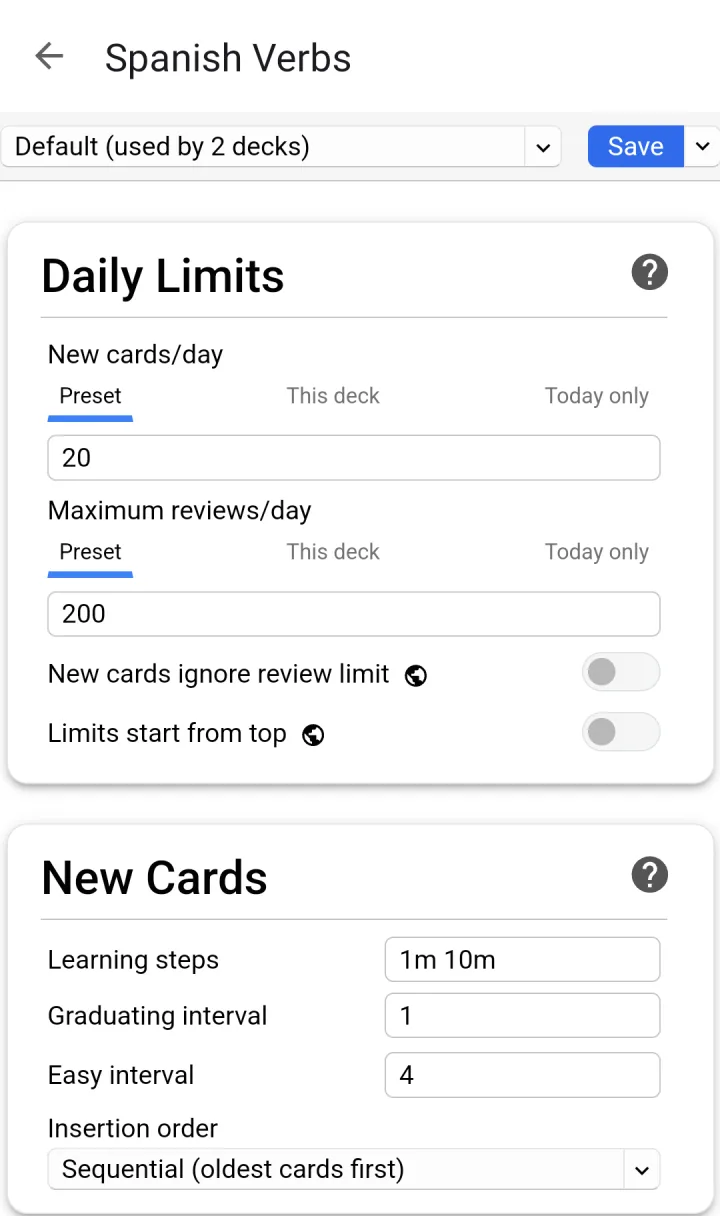
The options page opened with Default (used by 2 decks) at the top, although only one deck was on screen. The Anki manual (external site) explains why: every collection starts with a deck called Default, and the deck list hides it while it is empty. Both decks share the preset, so a change on the Preset tab applies to both.
Set the two daily limits
Each limit has three tabs. Preset edits the shared preset, This deck overrides it for the current deck only, and Today only is a temporary override. The deck options chapter of the Anki manual (external site) describes the same three levels.
Step 7 Lower both numbers
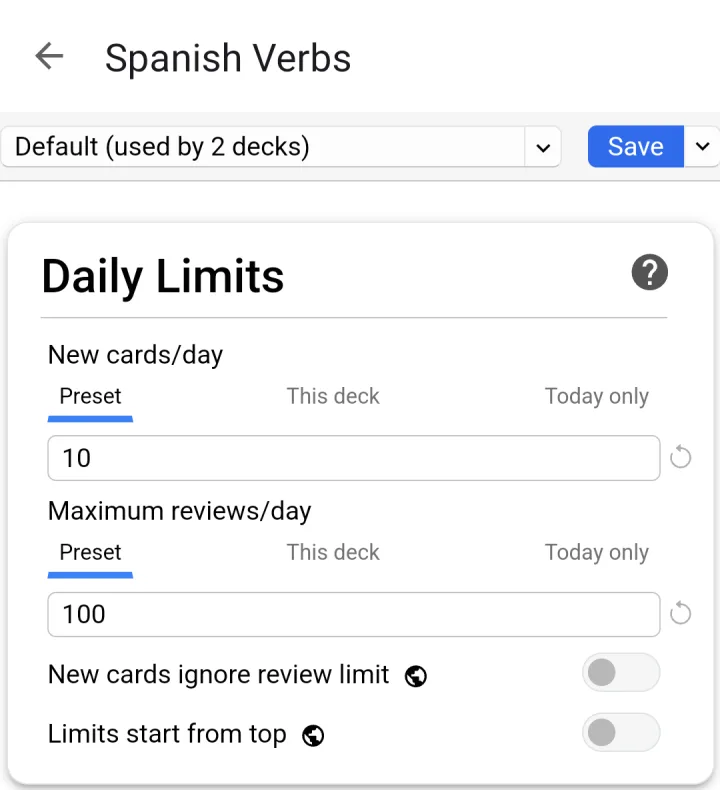
On the Preset tab we changed New cards/day from 20 to 10 and Maximum reviews/day from 200 to 100. A small circular arrow appeared next to each changed field. It resets the value, and it is also a quick way to see which fields you touched.
Step 8 Save and check the deck list
Tap the blue Save button. Back on the deck list, the blue count dropped from 12 to 10 and the header read 10 cards due. The other two new cards wait for a later day.

Why 10 and 100? The Anki manual (external site) says that learning 20 new cards a day leads to roughly 200 reviews a day, because fresh cards come back several times before their intervals grow. A review ceiling of about ten times the new-card limit follows the same ratio.
Raise the limit for one day only
Step 9 Use the Today only tab
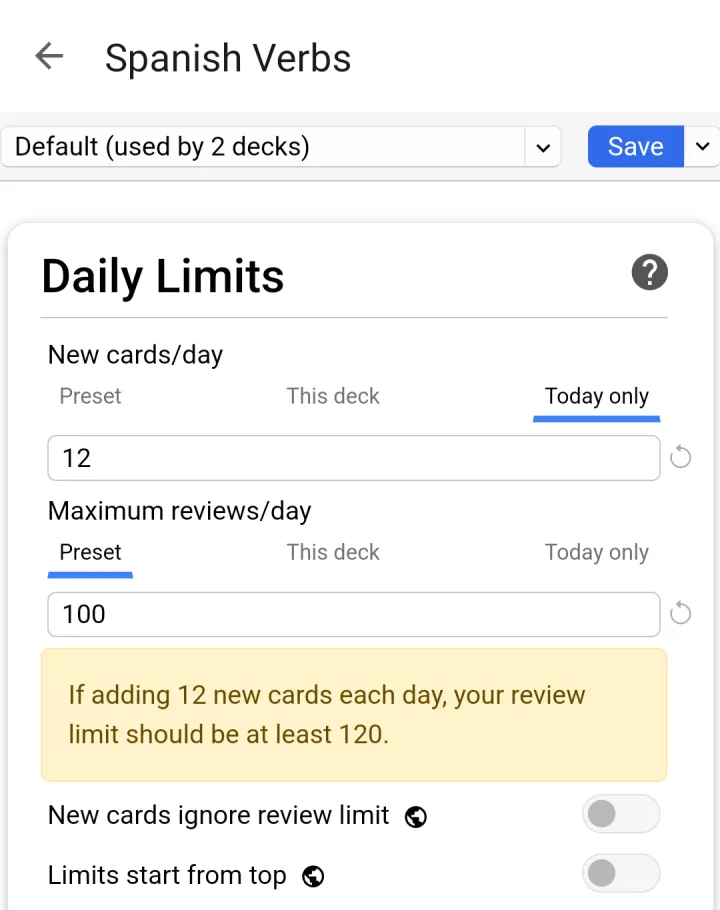
We reopened the options, chose Today only under New cards/day and typed 12. A yellow note appeared at once: If adding 12 new cards each day, your review limit should be at least 120. The review limit was still 100 from the preset.
Study the first card
Step 10 Tap the deck name
The study screen showed hablar. After Show answer, four buttons appeared with the time until the card returns: Again under 1 minute, Hard under 6 minutes, Good under 10 minutes and Easy 4 days.
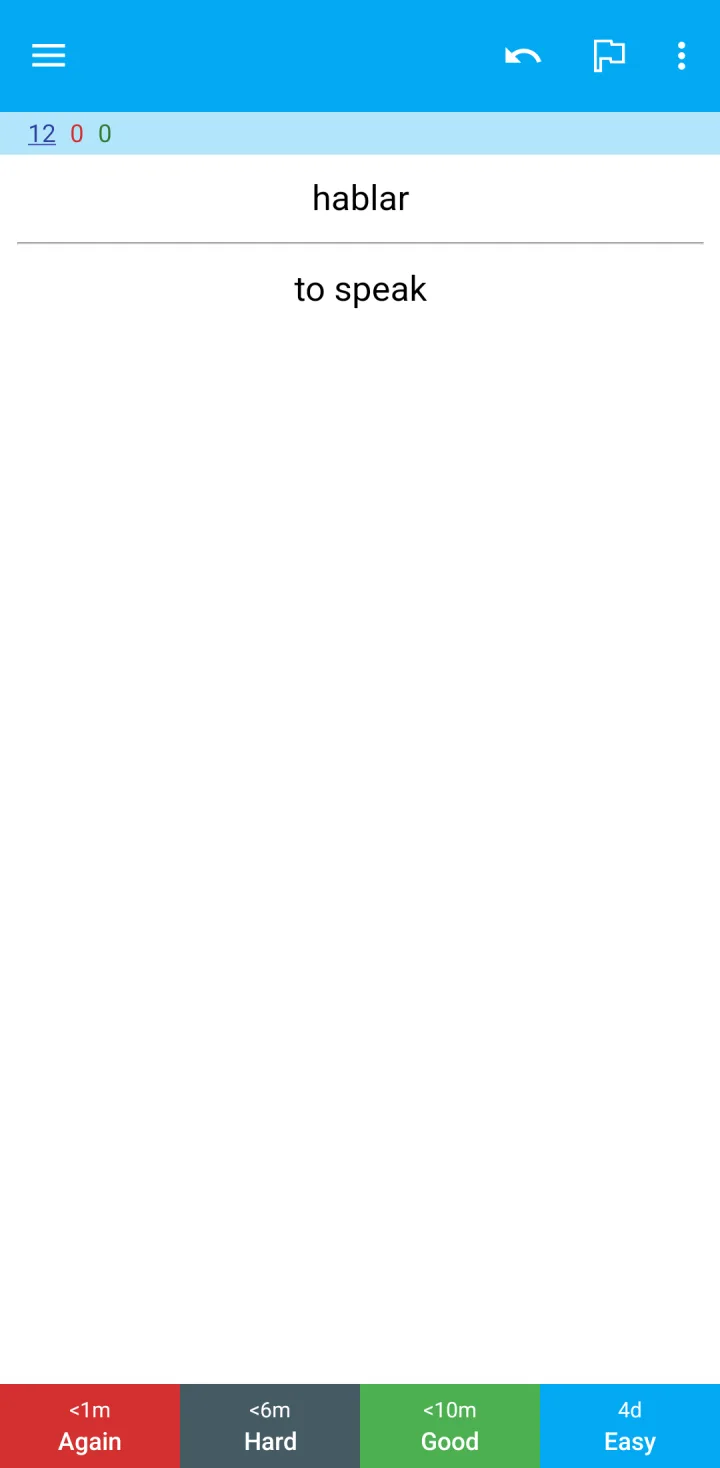
Those short times come from the default learning steps 1m 10m in the New Cards section of the same options page. We tapped Good. The counters above the card moved from 12 new and 0 learning to 11 new and 1 learning.
Quick reference
| Setting | Value in our fresh install | What we set | Where it lives |
|---|---|---|---|
| New cards/day | 20 | 10 on the preset, 12 for today only | Deck options, Daily Limits |
| Maximum reviews/day | 200 | 100 | Deck options, Daily Limits |
| Learning steps | 1m 10m | Unchanged | Deck options, New Cards |
| Relearning steps | 10m | Unchanged | Deck options, Lapses |
Common errors and how we fixed them
ProblemThe options page said used by 2 decks with only one deck on screen.
FixThe hidden Default deck shares the preset. Use the This deck tab for a change that affects one deck only. The Anki manual also describes an Add Preset option under the arrow next to Save; we did not test it.
ProblemThe deck showed 12 new cards, not the default 20.
FixNothing to fix. The limit is a ceiling, and the deck held only 12 cards.
ProblemTapping the deck opened a study session instead of the settings.
FixPress and hold the deck name to get the deck menu with Deck options.
ProblemA yellow note asked for a review limit of at least 120.
FixRaise Maximum reviews/day to the suggested value, or lower New cards/day until the note goes away.
Sources
We checked these sources on the test date.